Never lose the better version again.
Every version of your Live set is kept and compared. When a mix gets better, MixDelta shows you exactly what changed, so you’ll know the moves that did it and can make them again on the next track.
Every version of your Live set is kept and compared. When a mix gets better, MixDelta shows you exactly what changed, so you’ll know the moves that did it and can make them again on the next track.
Your folders can be a mess. MixDelta reads what’s in each set, not what you named it, so every save lands in the right song and every version you took it in gets its own line, however you’ve been saving.
In your folder 8 sets
In MixDelta 3 songs
If it groups something wrong, move it in one click. Nothing on disk changes, and you never need to rename or reorganize anything to make it work.
MixDelta keeps every save, every version you forked on purpose, the backups Live quietly throws away, and the moves you haven’t saved yet. It’s free version control for your Live sets, so a session that goes nowhere costs you nothing.
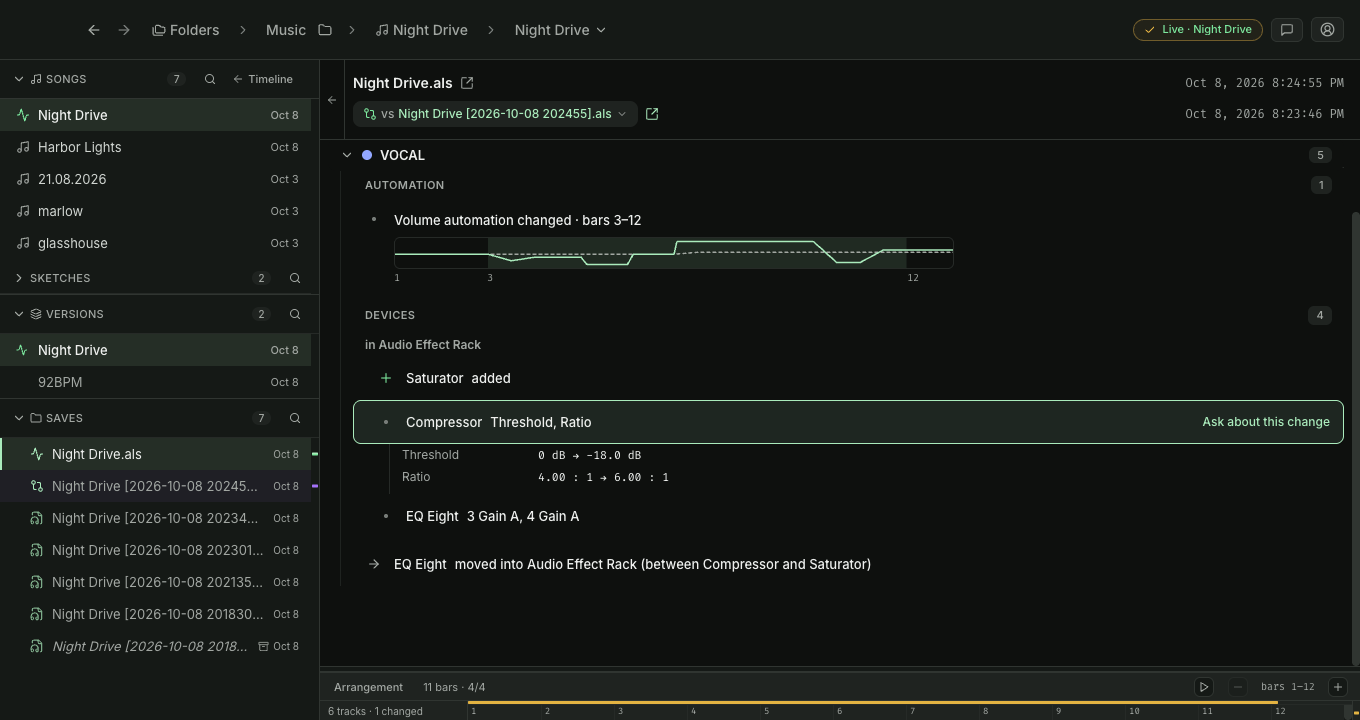
Learn what makes your mixes better. When yesterday’s version sounds better, open the two and MixDelta names every change the way you’d say it, down to the band, the device, and the clip that moved. You see which moves helped, and you start making them on purpose. Try it with two of your saves.
Compressor · Threshold 0 dB → −18.0 dB
“What did I change last night?” Flow state doesn’t take notes. MixDelta already knows what you touched since the last save, however you name your files, so you can pick up where the good idea left off.
Take the good part forward. Live keeps your last ten backups and deletes the oldest every time you save. MixDelta keeps all of them, so the save where the bass sat right is still there, along with what’s changed since. Drag that track in from Live’s browser and keep going. Need the whole version? It comes back as a new file beside your set, never over it.

Ask what to try next on the chorus, or what’s still between this version and done. Every save teaches it a little more about your mix, so the next move it suggests is the one you were already reaching for.
Ask it to try a lighter setting and it turns the knobs in Live. Revert switches back, so you can hear both and keep the one that sounds better. It’s a helper for testing your own ideas: your arrangement always belongs to you.
On the roadmap: A/B two versions side by side, and reference matching with real before and after numbers.

MixDelta reads your sets on your computer. When you ask the mix assistant about the mix, it analyses the audio on your machine and the assistant gets measurements like loudness and balance, not the audio itself.
Yes. MixDelta watches your project folder and keeps every version of your Live set automatically: every save, every backup, every Save As. It shows what changed between any two versions in plain language, so you can find the save where something worked and take that part into the set you’re on. A whole version can come back too, as a new file beside your set. There’s nothing to commit and no naming scheme to stick to. If you searched for “git for Ableton,” this is it, without the terminal.
Yes. A small Max for Live device installs with the app and sits in your set, noticing what you touch as you work: knobs, devices, clips. Save whenever you like. MixDelta already knows what moved since the last save, and shows you.
Live keeps your last ten backups and deletes the oldest every time you save. MixDelta keeps all of them. Dropbox keeps files, not meaning: it can’t tell you that the vocal bus lost 3 dB yesterday. MixDelta reads the set itself and names the change, device by device.
No. MixDelta never generates music and never touches your set uninvited. It remembers what you did, explains what changed, and when you ask, helps you test your own ideas. Your arrangement always belongs to you.
No. Your music stays on your computer. When you ask the mix assistant about the mix, it analyses the audio on your machine and sends only measurements, like loudness and balance, not the sound itself.
The mix assistant does: it uses AI to read your project’s settings, answer questions about your history, and make the adjustments you ask for in Ableton Live. It assists; it never generates music or audio. The version history itself, the part that watches, keeps, and compares, is ordinary local software.
No. MixDelta doesn’t change your sound: the device on your master passes audio straight through, adds no delay, and your CPU meter doesn’t move. It listens while you play and records only when you ask, so the mix assistant can talk about the actual mix.
Keeping every version of every project and seeing every change is free, with no card and no trial clock. The mix assistant runs on credits: a free weekly allowance, or Pro at founders pricing, which is $5 a month for as long as you stay subscribed.
Ableton Live 11 or 12, on macOS 11 or later (Apple Silicon and Intel) or Windows 10 or later.
Ableton Live only, for now.
Keeping every version of every project and seeing every change costs nothing, with no card and no trial clock. The mix assistant runs on credits: a free weekly allowance, and Pro at founders pricing, $5 a month, locked in for as long as you stay subscribed.
Ableton Live 11 & 12 · macOS 11+ (Universal) · Windows 10+ · Version 1.20.0 · Other versions & betas